Palo Alto Networks XSOAR SaaS Superna Zero Trust playbook integration
- Playbook Integration with Palo Alto Cortex xSOAR SaaS
- Overview
- Key Benefits
- Support Statement
- Solution Overview
- Solution Configuration in Cortex xSoar and Defender Zero Trust
- Prerequisites
- Video Overview
- Configure the Integration from the Marketplace
- Use Cases for these playbooks
Playbook Integration with Palo Alto Cortex xSOAR SaaS
Overview
SecOps Automation is a key requirement to combat the never ending threats to corporate data. Palo Alto Cortex SOAR (Security orchestration, automation and response) platform enables playbooks and automation to reduce the time to detect, respond to cross device threats. To support this type of automation, data from external security tools is vital in order to provide complete accurate and concise threat detection and details to allow automation to and SecOps teams the ability to respond to threats across the corporate IT infrastructure.
Key Benefits
- This integration allows customers to install a content pak from the marketplace and protect storage by leveraging Superna's Zero Trust API and Cyber Storage Capabilities
- Native Marketplace integration for easy deployment
Support Statement
- NOTE: This documentation is provided "as is" without support for 3rd party software. The level of support for this integration guide is best effort without any SLA on response time. No 3rd party product support can be provided by Superna directly. 3rd party components require support contracts
Solution Overview
Superna Defender Zero Trust API is the cornerstone technology used to integrate with SIEM, SOAR and XDR platforms. Automation begins with data that summarizes the threat and places that information into a SOAR to be acted on by Secops and run playbooks to protect corporate IT assets from vulnerabilities and insider or external attackers. In order to allow a SOAR to act on the data from an external tool it is vital to field map data from one alert to the schema used within the SOAR. This guide will cover basic field mapping used to push Zero Trust Ransomware Defender alerts into xSOAR
Solution Configuration in Cortex xSoar and Defender Zero Trust
Prerequisites
- Installed Superna Security Edition
- License key for the Zero Trust API or Subscription to Security Edition
- Installed Cortex xSOAR SaaS
- Installed on premise Engine to route api calls for the integration
- Eyeglass API token
- Login to Eyeglass VM as admin --> eyeglass rest API --> Create new token --> provide a name for the token eg Zero Trust, copy the token to be used in the steps below.
Video Overview
Configure the Integration from the Marketplace
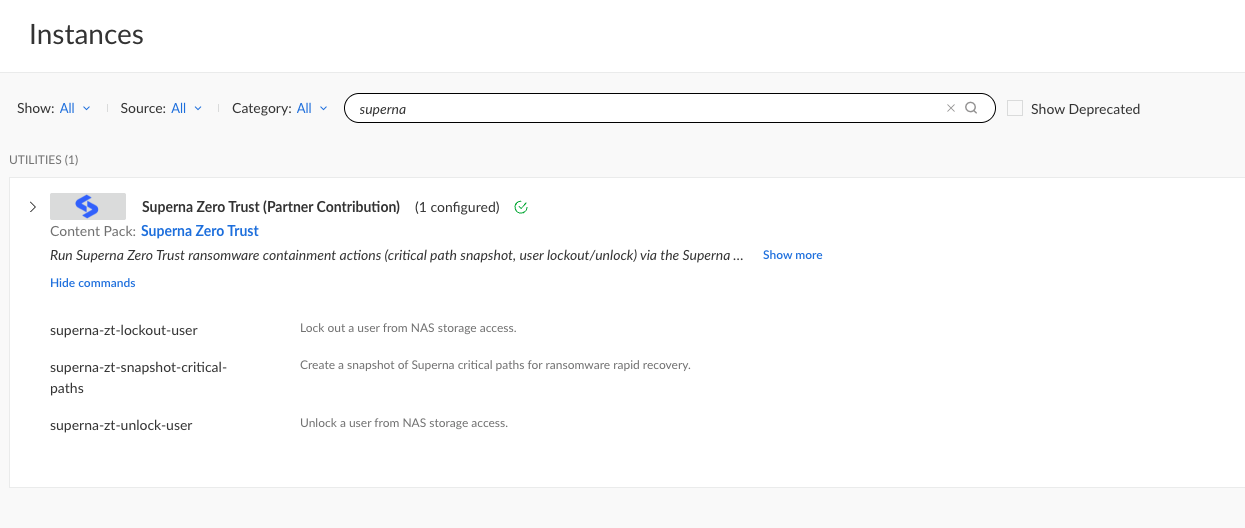
- Locate the Superna Integration in the marketplace and install an instance. https://cortex.marketplace.pan.dev/marketplace/details/SupernaZeroTrust/
- Enter the on premise endpoint ip address of the eyeglass vm.
- The api token created from eyeglass
- click the unsigned cert checkbox (unless you have a signed cert installed)
- In the drop down for engine, make sure to select an on premise engine VM that has IP reachability to the eyeglass vm over https 443
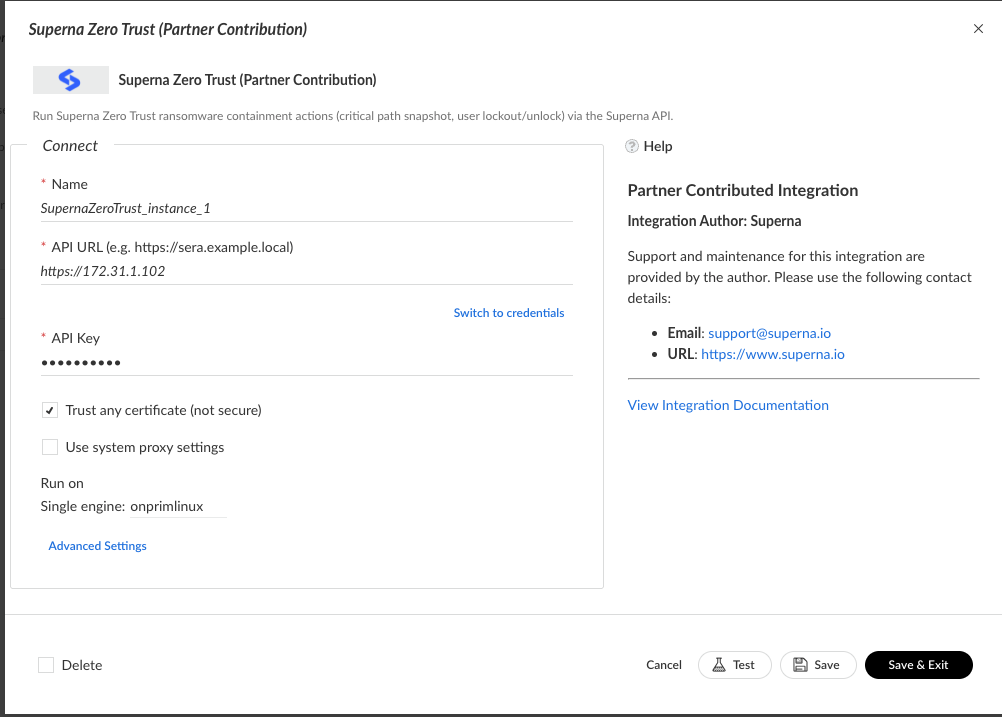
- Click the test button to verify API connection success, resolve issues if no success message.
- Save and Exit
- The integration is now installed and play books can be used.
- See the overview video on how to use the playbook outlined below.
Use Cases for these playbooks
- Snapshot PlayBook
- You can run this playbook for any incident where data security is at risk and an immutable snapshot is needed to protect critical data. The snapshot can be used to recover data and Cyber Storage analytics from Security Edition can detect malicious data activity and log file access. This is necessary to root cause what data was affected by a security incident.
- User Lockout Playbook
- You can run this playbook for any Superna Zero trust created alerts, as this playbook depends on the customer userID field to exists in the incident. If lockout mode in Superna Security Edition is not enabled allowing Secops to decide when a user lockout should occur. This moves the responsibility of data protection decisions to the Secops team versus the storage team.
- User Request Storage Lockout Playbook
- Offers an input question to accept the userID that should be locked out of storage. This playbook can be run by any Secops workflow where the threat to data is increased and a proactive step to ensure no data can be destroyed or it can be used as a step in a workflow when employees are leaving the company or have been terminated.
- User Request Storage Unlock for a user Playbook
- Offers an input question to accept the userID that should be unlocked from the storage. This playbook can be run by any Secops workflow to allow a user that was previously locked out to have the lockout removed.